
World's Hardest Game 2 is the sequel to Stephen Critoph's 2007 maze game, and the title screen still credits him for graphics and programming, under the name Snubby, with music by mexify895 and sound effects from Flash Kit. The rules haven't changed: red square, blue dots, yellow coins, green zone. What changed is the size. There are 50 levels here instead of 30, and the version on this page is an HTML5 build, not the old Flash file.
What's different from the first game
Besides the 20 extra levels, three things matter in practice. There's a Level Select on the main menu, which the first game's menu doesn't have. The game writes your level, fails and play time to the browser as you go. And the pause menu has a Player Color option next to separate mute switches for music and sound effects.
The counter at the top is called Fails now, not Deaths, and it sits next to Level and Coins. Coins show as a fraction, so on level 1 you start at 0/3 and always know how many are left.
Level 1 already has three coins
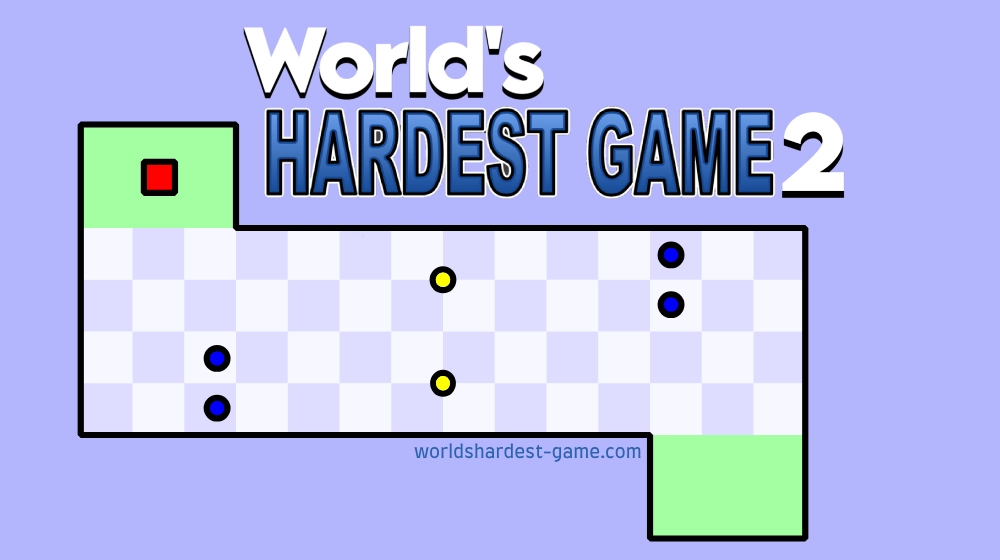
The first game eases you in with a coinless corridor. This one doesn't. Level 1 is a room that bulges out at the top and bottom between two green zones, with three coins: one in the top bulge and two along the bottom, each guarded by a pair of blue dots. You have to leave the safe line three times, something the original never asks on level 1.
Between levels a card shows one line of trash talk, a different one for each of the 50 levels. Level 1 opens with "You don't stand a chance." Level 12 tells you there are 38 levels to go. Level 46 says "You'd better clear your schedule..." and the last one just says "Impossible."
Keys, touch and the pause button
You move with the arrow keys or with WASD. Space starts the game from the loading screen and the main menu, P pauses and M mutes. On a touch screen you drag from wherever your finger lands, and the game draws a small cross at that point so you can see which way it reads the swipe. A short drag is enough to register a direction.
The bottom bar has Pause/Menu on the left and Mute on the right. The pause menu lists Resume Game, Main Menu, Level Select, Player Color, Mute SFX and Mute Music.
Where the ads appear
This build carries Google's game ads in two places. One can play while the game is still loading, before the Play Game button, and another can show between levels. When an ad runs, the game pauses and mutes itself and picks up where it was afterwards. The between-level break is the annoying one: it lands right after you clear a level, when you'd rather keep your rhythm going.
The menu button that wipes your save
Progress lives in your browser's local storage, not in an account. The game saves your level, fail count and timer every time you die and every time you clear a level. A private window, another device or cleared site data means starting from nothing, and there's no way to move a save between devices.
The bigger catch is on the main menu. Play Level 1, and the Space key on that screen, reset the level to 1, the fails to 0 and the timer to 0 straight away, with no warning and no confirm step. Once you're deep into a run, don't touch it.
If you haven't played the original yet
The original World's Hardest Game is shorter and slower to load, but its 30 levels teach the timing this one assumes you already have. Our route notes for the original's 30 levels don't map onto these 50, though most of the habits carry over: watch the loop, find standing room, never cross two gaps on one opening. The full series page lists every game in order.